
The Skyllful Platform is a cloud-based training solution built for frontline workers. The Skyllful Platform gives organizations everything they need to create on-the-job training, deliver it on mobile devices, and track whether employees are operationally ready to perform.
.png)
How is the Skyllful Platform organized?
The Skyllful Platform has three components that work together. Each component serves a different purpose and a different audience.
Component |
What it does |
Who uses it |
|---|---|---|
| Skyllful Studio | Create and publish training Lessons | Content Developers, Instructional Designers, Administrators |
| Skyllful Simulator | Access and complete training Assignments | Learners |
| Skyllful IQ | Track training progress and measure readiness |
Managers, Instructional Designers |
What is Skyllful Studio?
Skyllful Studio is the content authoring component of the Skyllful Platform. Content Developers use Studio to build interactive Lessons that simulate real software and workflows.
In Studio, you can:
- Capture screenshots or upload live workflows from any web-based application
- Build step-by-step Lessons using the Lesson Builder
- Choose how Learners interact with content using Lesson modes (Talkthrough, Walkthrough, Practice, Knowledge Check. and Video)
- Translate Lessons into multiple languages
- Review, approve, and publish Lessons to Learners
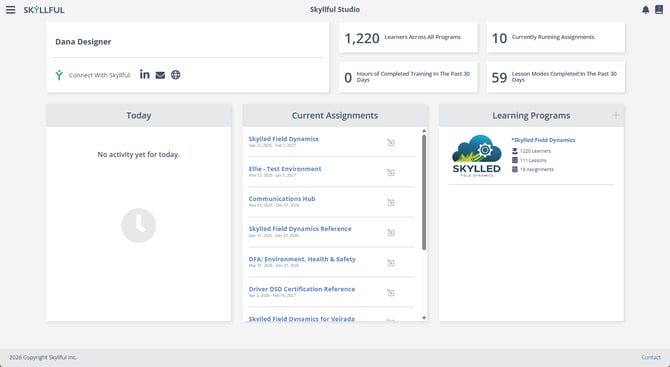
The Skyllful Studio Home screen, showing Learning Programs.
To get started with Studio, visit Build & Publish Content.
What is Skyllful Simulator?
Skyllful Simulator is the learner-facing training delivery component of the Skyllful Platform. Simulator works on mobile devices and desktop browsers, and supports offline use so Learners can train without an internet connection.
In Simulator, Learners can:
- View and open their assigned training
- Practice tasks in a safe, simulated environment
- Complete Knowledge Checks to demonstrate readiness
- Revisit content from completed Assignments to refresh their knowledge
- Download content to use offline
- Sync their progress when they reconnect
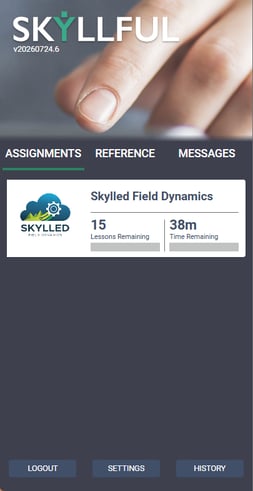
An interactive Lesson open in Skyllful Simulator on a mobile device.
To get started with Simulator, visit Learn & Complete Training.
What is Skyllful IQ?
Skyllful IQ is the analytics and reporting component of the Skyllful Platform. Managers and Administrators use IQ to see how Learners are progressing and whether they are ready to perform their jobs.
In IQ, you can:
- View completion rates and readiness scores by assignment
- Filter and sort data using custom views
- Send messages to Learners directly from the dashboard
- Export Learner performance data
- Reset Learner passwords
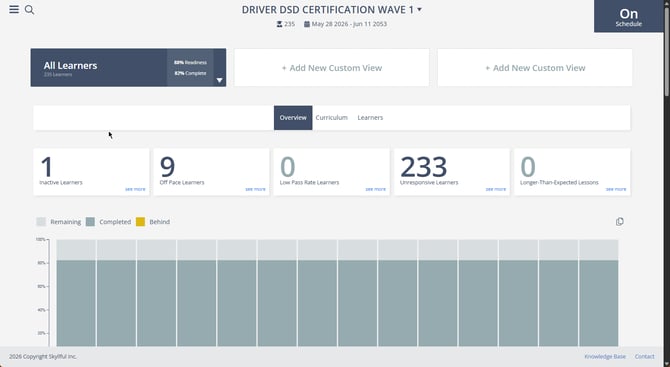
The Skyllful IQ Overview Lens, showing Learner progress.
To get started with IQ, visit Track Progress & Performance.
How do the three components work together?
A typical Skyllful workflow looks like this:
- A Content Developer builds a Lesson in Skyllful Studio and publishes it.
- An Administrator creates an Assignment and enrolls Learners.
- Learners open the Assignment in Skyllful Simulator and complete the training.
- A Manager reviews completion and readiness data in Skyllful IQ.
What are the key Skyllful Platform terms?
New to the Skyllful Platform? These are the most important terms you will see:
Term |
What it means |
|---|---|
| Lesson | A single interactive learning unit built in Skyllful Studio |
| Assignment | A time-based or event-based training initiative that delivers one or more Lessons to Learners |
| Learning Program | The top-level container that organizes all training content |
| Course | A grouping of related Modules within a Learning Program |
| Module | A grouping of related Lessons within a Course |
| Learner | An end user who takes Assignments in the Skyllful Platform |
| Replica | A digital copy of an app screen used to build interactive Lessons |
| Readiness | A measure of whether a Learner has completed and retained training |
For a full list of terms, visit Skyllful Glossary.
How do I get help with the Skyllful Platform?
If you cannot find what you need in this knowledge base, start with your manager, then your Local Administrator. If additional assistance is needed, your Local Administrator can submit a support ticket to Skyllful. You can also visit Troubleshoot & Get Help.
Skyllful Knowledge Base | All Audiences