
What's new in this release?
In our ongoing commitment to making the Skyllful experience positive, we are excited to announce the following updates in our March 2025 release:
Skyllful Studio: Replica Maker enhancements
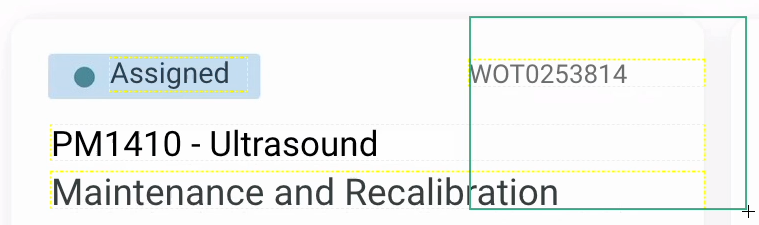
New Replica Maker tools: Lasso Selection and Eyedropper for text styling.
Lasso Selection Tool
We've introduced a Lasso Selection Tool to simplify the process of selecting multiple elements within Replica Maker:
- Intuitive Selection: Drag your mouse to draw a square to select the elements you want to edit.
- Multi-Element Selection: Hold the Shift key while using the lasso to add additional elements from different UI sections.
- Easy Deselect: Click outside the selected area to quickly deselect all elements.
Eyedropper Tool for text styling
To ensure consistent text styling across replicas, we've added an Eyedropper Tool:
- Quick Style Matching: After selecting the element you wish to restyle, select the eyedropper icon and click on any text element to copy its style attributes instantly.
Skyllful Studio: Auto Translation improvements

Translate an individual text field with one click.
Individual Text Field Translation
Our Auto Translation feature now offers more granular control:
- Just One Click: Click the Translate button located between the original and translation fields; the system will process the translation, and within a few seconds, the translated text will appear in the corresponding field.
Skyllful Studio: Learning Program Settings update
Default Prompt Styling
To maintain consistency across learning materials, we've added a Default Prompt Styling feature in the recently added Learning Program Settings:
- Customizable Defaults: Set default styles for prompts, including background color (light or dark), spotlight outlines, and popup window styles.
- No More Cutting/Pasting: New lessons and steps will automatically inherit these default styles, ensuring uniformity without repetitive copying and pasting styles.
- Please Note: Changes to default prompt styles will apply only to new content; existing lessons and steps will remain unchanged.
Share Assignments and Lessons with direct links and QR codes
Skyllful now makes it easier to guide your learners exactly where they need to go, with direct URLs and QR codes for both assignments and individual lessons.
What you can do:
- Copy a URL or QR code for any assignment or lesson from Assignment Settings
- Paste them into documents, emails, or study guides
- Works across Web, iOS, and Android Simulators
Example: Building a training guide for field techs? Add QR codes they can scan to launch lessons instantly in the simulator.
What's coming next?
Expanded Learning Program Settings functionality! While we continue to improve the text extraction/styling capabilities of Replica Maker, we are also expanding the functionality of the Learning Program Settings functions of Studio. You'll be able to set default VO styles for each language in your Learning Program as well as retroactively apply those styles and prompt style defaults to existing lessons with just a couple of clicks.
Please continue bringing your ideas and requests forward so we can turn them into actionable platform improvements that effectively target your needs.