

What's new in this release?
We'd love to share some of the newest features in the Skyllful platform. This month we've made significant improvements to the assignment monitoring experience.
In one view, Stakeholders and Managers get a learning performance snapshot across their entire learning program.
Skyllful IQ: Assignments Dashboard
The most significant improvements to the Skyllful platform have been the enhanced search capabilities. Enhanced search features accommodate for typos, are optimized to rank based on relevance, and include assignment information.
Detailed Progress Tracking
Progress tracking can toggle between percentage and lesson measures for a more comprehensive understanding of users' completion. This new view includes an at-a-glance tracking bar graph above the assignments with contrast and the number of learners assigned to each task.
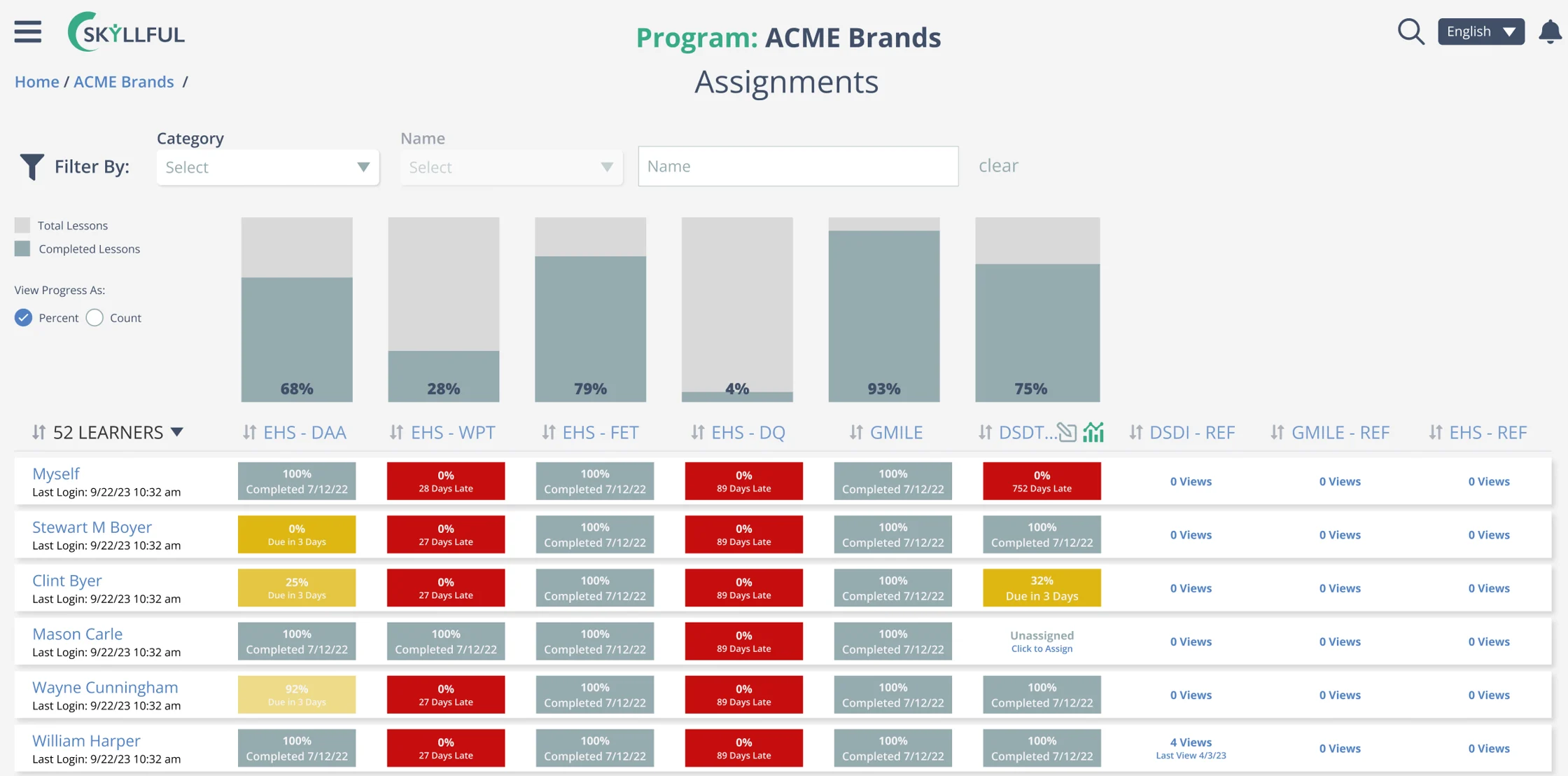
Toggle progress between percentage and lesson measures.
Seamless Navigation
Easily navigate the dashboard by clicking on a learner's name to see the assignments they've had assigned. Click on the company name to view all learners within the organization.

Click a learner or company name to navigate the dashboard.
Intuitive Filtering
Easily filter against criteria such as assignment, job role, tag, last login date, or location.

Filter by assignment, job role, tag, last login, or location.
Enhanced Drill-Down Capability
With a click from the Assignments Dashboard, users can now drill down into the IQ view for an assignment and see individual learner performance on a more granular level. As an additional convenience, anytime a user drills down into IQ from the Assignments Dashboard a Custom View in IQ is automatically created.

Drill into any assignment for granular learner performance.
Click To Assign
Administrators and Managers can now easily assign users to new assignments with a simple click, eliminating the need to backtrack to the Assignments Administration page. They can take it a step further by filtering users (job role, company, tags, etc.) and assigning those groups of users to an assignment. This functionality will save time for administrators and enable managers to assign their direct reports.

Assign users to an assignment with a single click.
Additional updates
Improved Element Dragging in Replica Maker
Studio users can now move multiple elements in bulk. Simply select the elements you want to move and drag the entire group to a new location. Alternately, you can hold down the arrow keys to adjust placement making for a more straightforward content editing process.
Improved Pasting Logic in Replica Maker
Skyllful recognizes when you are trying to paste content onto a screen that is sized differently than the screen you copied the elements. No longer will you receive an "out of bounds" error; instead, Skyllful will automatically solve for this discrepancy by shifting your elements towards the interior of your paste screen.
As always, we are continuously incorporating feedback from customers, prospects, and partners into enhancements for Skyllful. Keep an eye out for even more exciting improvements coming next month.