

What's new in this release?
We are pleased to announce the arrival of custom prompt styling! Discover how you can tailor walkthroughs, practice sessions, and knowledge checks to align with your preferences and corporate style guides.
Skyllful Studio: Spotlight styling
Customize the spotlight background and outline for each prompt.
Within the General tab for a step, you now have the option to customize the prompt's appearance by selecting either a light or dark lightbox background effect. Additionally, you can enable or disable an outline around the highlighted control and adjust the thickness of the spotlight outline to suit your preferences.
Skyllful Studio: Prompt color customization
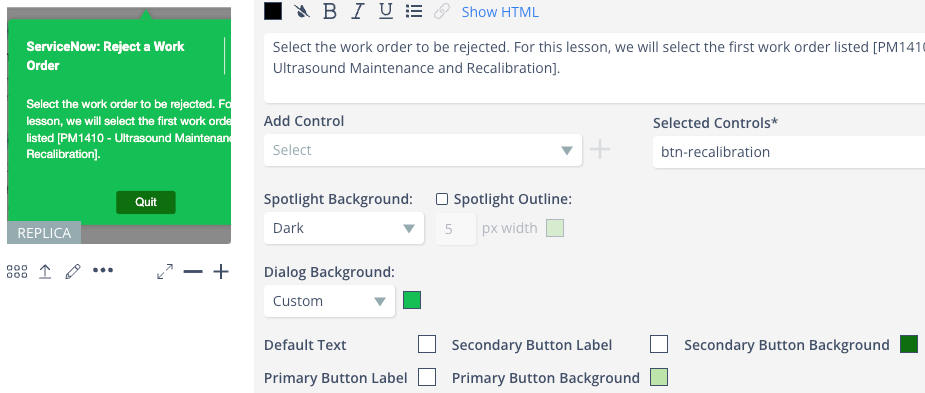
Personalize prompt colors to match your style guide.
Alongside modifying the background lightbox effect, you have the flexibility to personalize the colors of the prompt itself.
Skyllful Studio: Additional prompt styling features
You can copy/paste stylings at the individual step level or for the whole lesson via the context menu for the lesson.
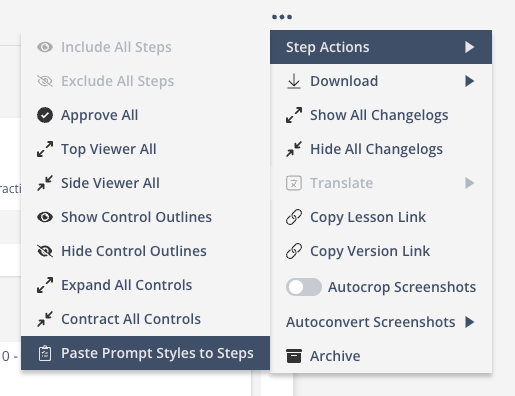
Copy and paste styling at the step or whole-lesson level.
Lastly, for "no action required" prompts, you can anchor the prompt relative to the viewing window. This will help avoid instances of content in the UI underneath.
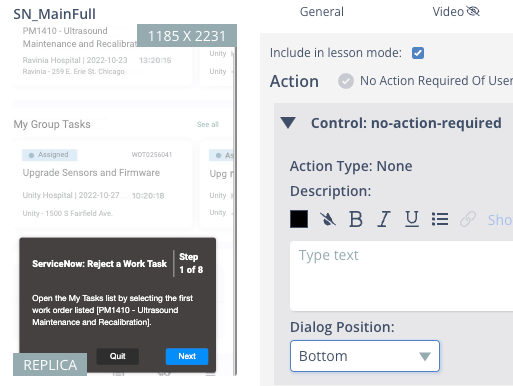
Anchor no-action prompts relative to the viewing window.
What's coming next?
Improved features in the Simulator apps! Keep an eye out for improved functionality in the iOS, Android, and web simulator apps. Users will be able to better manage content they've downloaded onto the devices as well as switch between languages easier. Additionally, iOS and Android simulator apps will have an embedded QR code reader to better facilitate the use of enrollment links.
Please continue bringing your ideas and requests forward so we can turn them into actionable platform improvements that effectively target your needs.