
What's new in this release?
Here's a quick look at what we've been working on over the past month:
This month's updates are all about making your training content easier to manage and more consistent for your learners. From easier default setting to bulk updates and better sharing tools, here's what's new in Skyllful.
Skyllful Studio: Set default AI voiceovers at the program level
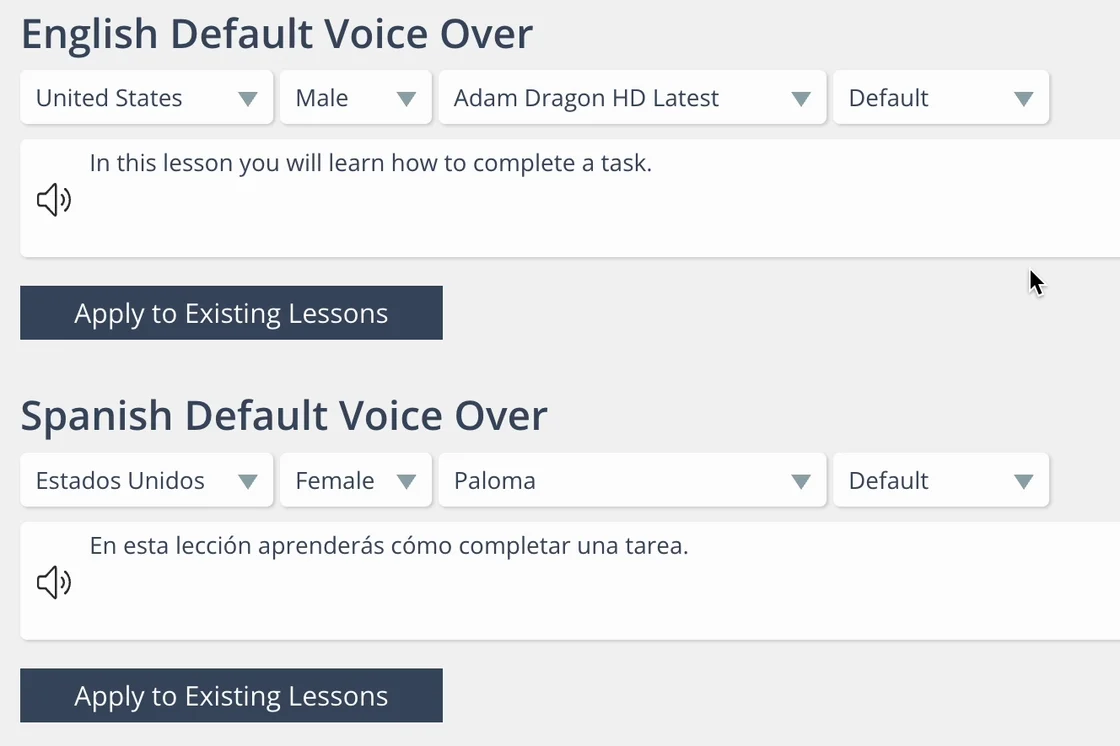
Set a default AI voice per language and apply it across your library.
Tired of manually setting voiceovers for every lesson? Now you can configure default AI voiceovers for each language directly in the Learning Program Settings screen. These voiceovers will automatically apply to any new lessons or steps you create, and you can even apply them to existing content.
What's new:
- Set default voices for each enabled language (e.g., English, Spanish)
- Apply these defaults automatically to new lessons and steps
- Use the Apply to Existing Lessons button to retroactively update voiceovers in previously created content
Example: Standardize your voiceover settings by selecting United States English or English and applying that across your entire library in just a few clicks.
Skyllful Studio: Apply default prompt styles to existing Lessons
Consistency is key, especially when it comes to the look and feel of your content. With this update, you can now retroactively apply your default prompt style to any course, module, or lesson.
What's new:
- Default prompt styles can now be applied to existing lessons via Lesson Defaults
- Choose to apply the style to an entire course, module, or specific lessons
- No more manual updates lesson by lesson
Use case: If your team wants the prompt colors to match your company's new branding guidelines, apply those changes across your library with a couple of clicks.
Automatic versioning for bulk actions
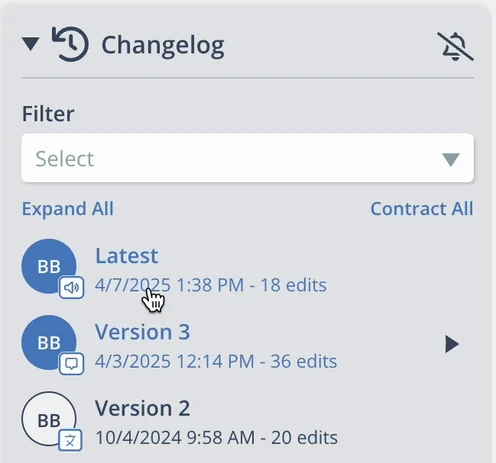
Bulk updates automatically create a new, traceable lesson version.
When you apply updates in bulk, like changing voiceover or prompt styles, Skyllful will now automatically create a new version of every lesson affected with an icon that specifies what kind of bulk operation created the version. This ensures traceability and gives you peace of mind when updating at scale.
Bulk actions that trigger versioning:
- Changing voiceover style (e.g., switching to natural voice)
- Applying new prompt styles
- Automatic translations (when combined with the above)
Each update is tracked in the lesson changelog with icons showing the change type and author, making audits easy.
Why it matters: You'll always know what changed, when, and by whom, with rollback options built in.
Share Assignments and Lessons with direct links and QR codes
Skyllful now makes it easier to guide your learners exactly where they need to go, with direct URLs and QR codes for both assignments and individual lessons.
What you can do:
- Copy a URL or QR code for any assignment or lesson from Assignment Settings
- Paste them into documents, emails, or study guides
- Works across Web, iOS, and Android Simulators
Example: Building a training guide for field techs? Add QR codes they can scan to launch lessons instantly in the simulator.
What's coming next?
Simulator UI improvements and better font detection! Our engineering team is currently working on improving the UI for the Simulator experience to better accommodate long lesson titles. Additionally, work continues on better font detection and prediction which will increase the fidelity of Screen Replicas created with Replica Maker.
Please continue bringing your ideas and requests forward so we can turn them into actionable platform improvements that effectively target your needs.