
What is Skyllful Studio?
Skyllful Studio is where effective learning begins. You use Studio to build interactive, real-world Lessons that show your team not just how to do their work, but why it matters. Content Developers, Instructional Designers, Subject Matter Experts, and Administrators build, manage, and publish Lessons in Studio. Learners then complete those Lessons on their work devices through Skyllful Simulator. This article refers to Skyllful Studio as Studio from this point on.
What can you build and manage in Studio?
Studio gives you everything you need to build training and deliver it to the right people. The work builds from the ground up, starting with the pieces of a Lesson and ending with training in learners' hands.
| What you can do | Description |
|---|---|
| Build Replicas | Create a Replica, a digital copy of an app screen, with interactive controls that behave like the real application. Replicas are the building blocks you use inside your Lessons. |
| Build Lessons | Use Replicas to build lesson exercises, including Talkthrough, Walkthrough, Practice, Knowledge Check, and Video. |
| Manage training | Enroll Learners and create Assignments that deliver Lessons to the right people. |
What is the Studio Home screen?
The Studio Home screen is the first screen you see after you sign in to Skyllful Studio. From the Home screen, you can view summary metrics, open your Learning Programs, and track current Assignments.
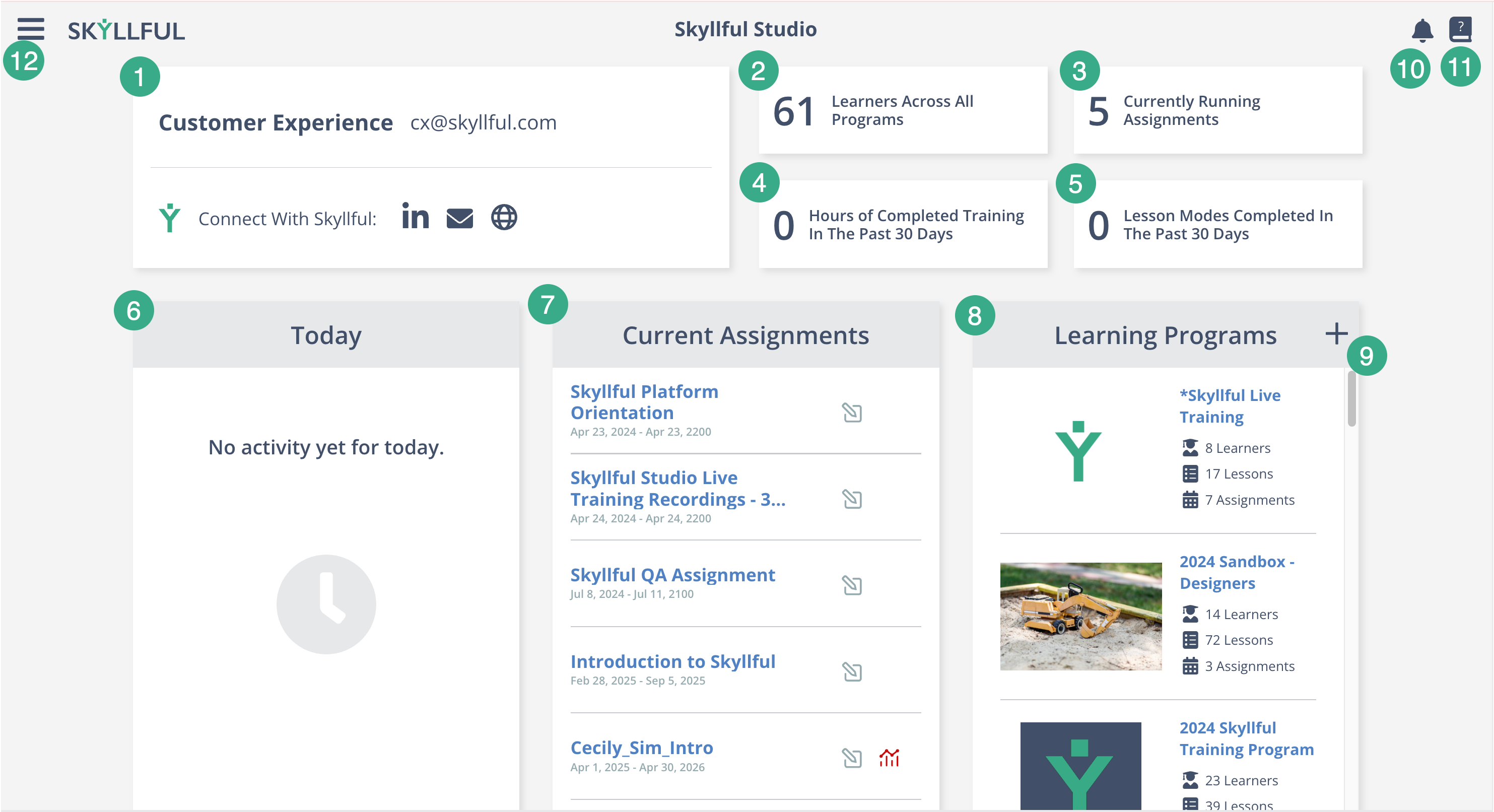
The Skyllful Studio Home screen, with each element numbered to match the table below.
What do the elements on the Studio Home screen do?
The table below describes each numbered element on the Studio Home screen.
| # | Element | What it does |
|---|---|---|
1 |
User Info Card | Shows your profile, including your User Name, User Email, and the Connect With Skyllful links. |
2 |
Learners Across All Programs (Metric Card) | The total number of Learners in all active Learning Programs. |
3 |
Currently Running Assignments (Metric Card) | The number of Assignments currently active across all programs. |
4 |
Hours of Completed Training In The Past 30 Days (Metric Card) | The total training hours Learners completed in the last 30 days. |
5 |
Lesson Modes Completed In The Past 30 Days (Metric Card) | The number of Lesson modes completed in the last 30 days, across Talkthrough, Walkthrough, Practice, Knowledge Check, and Video. |
6 |
Today Card | Shows recent activity happening today across your programs. |
7 |
Current Assignments Card | Lists the active Assignments available to Learners. |
8 |
Learning Programs Card | Lists all Learning Programs. Select a Learning Program to view its Courses and Modules. |
9 |
Learning Program Add New Button (+ icon) | Creates a new Learning Program. |
10 |
Notification Bubble | The bell icon that shows Platform notifications and comments about your Lessons. |
11 |
Knowledge Base Link | The icon that opens Skyllful's documentation at www.skyllful.com/knowledge. |
12 |
Hamburger Menu | The three-line icon in the top left. Opens the main navigation menu to Studio, Learning Programs, Courses, and more. |
Depending on your permissions, you may also see the Skyllful Sam icon, a Y-shaped icon in the top right that opens the AI interface for data questions. Skyllful Sam is not available to everyone, so you may not see it on your Home screen. It is not numbered in the screenshot above.
Important notes
-
Element visibility on the Studio Home screen is permission-based, so you may not see every element listed in this article.
-
Skyllful Studio and Skyllful IQ work best on a desktop browser.
-
Skyllful Simulator is the mobile-first component that Learners use to complete Lessons.
Skyllful Knowledge Base | Content Developers, Instructional Designers, Subject Matter Experts, Administrators