
What is the Video Library?
The Video Library is the central store for every video in a Learning Program. Keeping videos here, rather than scattered across shared drives such as Dropbox, SharePoint, or Google Drive, means your team always knows where lesson footage lives.
It holds two kinds of video, each on its own tab: Lesson Videos, the finished videos available to learners in Lessons, and Source Videos, the footage your subject matter experts record as source content for building Lessons.
Each video card shows the video's duration, its file size, who uploaded it, the upload date, and how many Lessons use it.
Each Learning Program has its own Video Library. Videos uploaded to one program are not available in another.
It is one of three asset libraries in Studio, alongside the Image Library and the Screen Library.
How do you open the Video Library?
Step |
Action |
|---|---|
| 1 | Open your Learning Program in Skyllful Studio. |
| 2 | Scroll to the Quick Links row on the Learning Program Overview. |
| 3 | Select Video Library. |
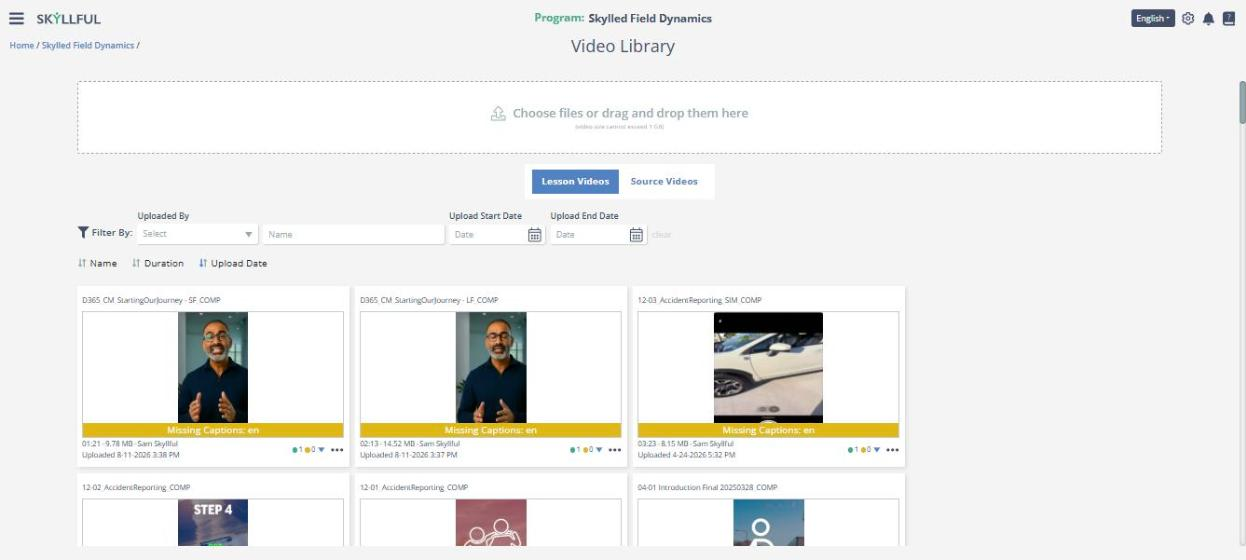
The Video Library: upload area, the Lesson Videos and Source Videos tabs, filters, and video cards.
How do you add a video?
Where you upload depends on the kind of video you are adding.
To add |
Do this |
|---|---|
| A Lesson Video | Open the Lesson Videos tab, then select Choose files or drag and drop the video onto the upload area. You can also add a video from Lesson Builder directly into a Lesson. |
| A Source Video | Open the Source Videos tab, then select Choose files or drag and drop the video onto the upload area. |
| A Source Video from a phone | Have the SME scan the QR code in the upload area with their device camera. The recording uploads straight from their device. |
A single video cannot exceed 1 GB.
What is the difference between Lesson Videos and Source Videos?
Tab |
What it holds |
|---|---|
| Lesson Videos | The finished videos available to learners in Lessons. Upload them here, or add them from Lesson Builder directly into a Lesson. |
| Source Videos | Footage, typically recorded by a subject matter expert (SME), used as source content for building Lessons. These are the videos you open in Replica Video Capture. |
A video does not have to stay where it landed. The card menu includes Move to "Source Videos", so you can keep the Lesson Videos tab tidy as content changes.
How do you find a video?
Control |
What it does |
|---|---|
| Filter | Narrow the list by Uploaded By, Name, Upload Start Date, or Upload End Date. |
| Sort | Reorder by Name, Duration, or Upload Date. Select the same control again to reverse the order. |
| clear | Reset the filters. |
What can you do with a video?
Select the menu icon (⋯) on a video card. The options you see depend on the video and your permissions.
Option |
What it does |
|---|---|
| Preview | Watch the video without leaving the library. |
| Pick Thumbnail | Choose the frame shown on the video card. |
| Open in Replica Video Capture | Open the video in Skyllful's built-in capture tool. |
| Move to "Source Videos" | Move the video to the Source Videos tab. |
| Download Video | Download the video file. |
| Upload Captions | Add a caption file to the video. |
| Download Captions | Download the video's caption file. |
| Remove Captions | Remove a caption file from the video. |
| Archive | Remove the video from active use. |
How do you know a video is missing captions?
A Missing Captions badge appears on any video that has no caption file for a language, and names the language, such as Missing Captions: en. To add a caption file, select Upload Captions from the video's menu.
FAQ
Is there a size limit for a video? Yes. A single video cannot exceed 1 GB.
Can you reuse the same video in more than one Lesson? Yes. Once a video is in the Video Library, you can use it in any Lesson in the Learning Program.
Is the Video Library shared across Learning Programs? No. Each program has its own library.
What are Source Videos for? They are the raw material for Lessons. A subject matter expert records a workflow, uploads it to the Source Videos tab, or scans the QR code to send it straight from their device, and the content team opens it in Replica Video Capture to build Lesson content from it.
Why does the library beat a shared drive? Every video sits next to the Lessons that use it, with its usage, captions, and upload history visible in one place.
Skyllful Knowledge Base | Content Developers