
Where do you find the Skyllful sign-in link?
Your organization has its own link to the Skyllful Platform. If you do not have it, contact your Local Administrator for the correct URL.
Before you begin
Your organization sets your login method. If you are not sure which method to use, contact your Local Administrator before you sign in.
How do you sign in to the Skyllful Platform?
1. |
Select Get Started on the Skyllful Sign-In Screen.
|
2. |
Select your organization's login method: (A) Skyllful Authentication or (B) Microsoft Entra ID (Azure AD), or Okta.
|
3. |
Enter your credentials and sign in. |
| Once you sign in, the Skyllful Platform opens to your starting screen. |
 The Skyllful Sign-In Screen. Select Get Started to begin.
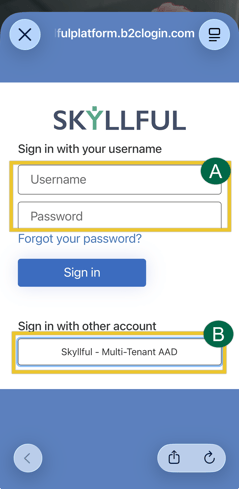 Choose the login method your organization uses.
Which login method should you choose?
Your organization uses one of the following. If you are unsure, ask your Local Administrator.
Login Method |
Use When |
What You Enter |
|---|---|---|
A. Skyllful Authentication |
Your organization uses Skyllful-hosted credentials. | A username and password created and hosted by Skyllful. |
B. Microsoft Entra ID (Azure AD) |
Your organization signs in with Microsoft work accounts. | Your organization's Microsoft Entra ID (formerly Azure Active Directory) work account. |
B. Okta |
Your organization signs in with Okta. | Your organization's Okta account. |
What happens after you sign in?
The Skyllful Platform directs you to a starting screen based on the link you used.
If you signed in with... |
Then... |
|---|---|
| The general login URL | The Skyllful Platform directs you to the component of your highest level of access (Studio, then IQ, then Simulator). |
| An individual link | The Skyllful Platform signs you in to that specific area. |
Important notes
Best Practice: Skyllful Simulator is a mobile-first component. Skyllful Studio and Skyllful IQ work best on a desktop browser.
What if you cannot sign in?
Start with the most common causes below. If none of these resolve the issue, contact your Local Administrator. If your Local Administrator cannot resolve it, they can submit a ticket through the Skyllful support portal.
If... |
Then... |
|---|---|
| You selected the wrong login method | Return to the Sign-In Screen, select Get Started again, and choose the method your organization uses. |
| Your username or password is not recognized |
Confirm you are using the credentials for your organization's login method. You cannot reset your own Skyllful Authentication password. Contact your manager or Local Administrator, who can reset it for you in Skyllful IQ. For Microsoft Entra ID or Okta, reset through your organization's own account recovery, or contact your Local Administrator. |
| You see an "account not found" or "no access" message | Your account may not be set up yet. Contact your Local Administrator to confirm your access. |
For more detailed help, see Learner Unable to Login
Frequently asked questions
What if I don't know my organization's sign-in link?
Contact your Local Administrator. Each organization has its own Skyllful Platform link.
What do I do if I forget my password?
It depends on your login method. For Skyllful Authentication, you cannot reset it yourself. Contact your manager or Local Administrator, who can reset it for you in Skyllful IQ. For Microsoft Entra ID or Okta, reset through your organization's own account recovery, or contact your Local Administrator.
Which device or browser should I use?
Use a mobile device for Skyllful Simulator, which is mobile-first. Use a desktop browser for Skyllful Studio and Skyllful IQ.
Skyllful Knowledge Base | All Audiences