
What do publishing and unpublishing do?
Publishing controls learner access. It does not change the content itself.
Action |
Effect |
|---|---|
| Publish | Makes the course or module eligible for learners to receive. |
| Unpublish | Takes it back offline. The content and everything inside it stay intact. |
Publishing on its own does not put content in front of learners. A learner can open content only when it is published and included in an active assignment. Both conditions have to be true.
That gives you room to work. Content can sit published indefinitely without a single learner seeing it, as long as it is not part of an active assignment. You do not have to hold finished content back from publishing in order to control when training starts, because the assignment controls the timing.
Unpublishing is reversible and non-destructive. Use it whenever content needs to come down temporarily.
Does publishing cascade?
Yes. Publishing and unpublishing act on everything nested inside the item you select, so you do not have to work through a course level by level.
You publish or unpublish |
What it affects |
|---|---|
| A course | The course and all of its modules and lessons |
| A module | The module and all of its lessons |
This cuts both ways. Unpublishing a course to fix one outdated module takes the whole course offline, including the modules that were fine. If only part of a course needs work, unpublish that module instead and leave the rest available.
How do you publish a course or module?
Step |
Action |
|---|---|
| 1 | Select the menu icon (☰), select your program name, select Studio, then select Courses Overview. |
| 2 | To publish a module, select its course in the Courses panel first. To publish a course, skip this step. |
| 3 | Select the ... at the right of the row. |
| 4 | Select Publish. |
The action takes effect as soon as you select it. There is no confirmation prompt.
How do you unpublish a course or module?
Step |
Action |
|---|---|
| 1 | Navigate to the course or module on the Courses Overview screen. |
| 2 | Select the ... at the right of the row. |
| 3 | Select Unpublish. |
Unpublish also takes effect immediately, with no confirmation prompt. Publish and Unpublish are two separate entries in the menu rather than one toggle, so read the menu before selecting.
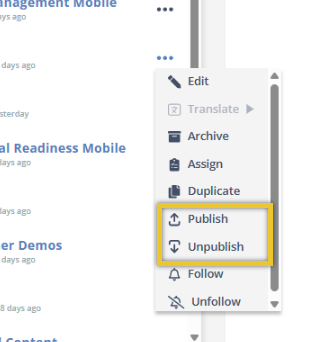
Publish and Unpublish are two separate entries in the actions menu.
When should you unpublish instead of archive?
Both take content out of circulation, but they answer different questions.
Situation |
Use |
|---|---|
| A process changed and the module needs rewriting this week | Unpublish |
| Content is ready but the rollout date has not arrived | Publish it and let the assignment dates control the rollout |
| A system was retired and the training will never run again | Archive |
| You want the content back soon | Unpublish |
| You are cleaning up a program's active list | Archive |
The rule of thumb: unpublish is a pause, archive is a retirement. See Archive a Course or Module.
FAQ
Does unpublishing delete anything? No. The course or module and everything inside it stay intact. Only learner access changes.
Can I republish something I unpublished? Yes. Select Publish from the same actions menu.
Does publishing make content visible to learners right away? Not on its own. A learner can only open content that is published and included in an active assignment. Publishing makes it eligible, and the assignment decides who sees it and when.
Can I leave content published if nobody should see it yet? Yes. Published content that is not part of an active assignment is not reachable by learners, so there is no need to keep finished content unpublished while you wait for a start date.
Does publishing a course publish its modules? Yes. Publishing and unpublishing cascade to everything nested inside the item you select, so a course carries its modules and lessons with it.
Can I unpublish just one module without taking down the whole course? Yes. Unpublish the module rather than the course, and the rest of the course stays available to learners.
Will I be asked to confirm? No. Publish and Unpublish take effect the moment you select them, so check which row you are on before you choose.
What happens to a learner who is partway through? Check your active assignments before unpublishing content that is in progress.
Why are Publish and Unpublish separate menu items? The menu lists them as two distinct actions rather than a single toggle, so both appear whatever the current state.
Skyllful Knowledge Base | Administrators, Content Developers