
What can you reorganize?
Modules and lessons are the flexible layers of a Learning Program. Both can be reordered within their parent, and both can be moved or copied to a different parent. Everything below happens on the Courses Overview screen.
Level |
Can be reordered by dragging |
Can be moved or copied |
|---|---|---|
| Courses | No. Courses are listed alphabetically. | No. A course sits directly under the Learning Program. |
| Modules | Yes, within their course | Yes, to another course |
| Lessons | Yes, within their module | Yes, to another course and/or module |
Courses are the fixed layer. They are listed alphabetically and there is no manual sort order to set, so the way to influence where a course appears in the list is to name it deliberately. Teams often use a shared prefix, such as a year or a system name, to keep related courses together.
Modules and lessons work the same way as each other. The only difference is which panel you work in and what the destination is: a module moves to a course, and a lesson moves to a module.
How do you reorder modules or lessons?
Items appear in the panel in the order learners encounter them. Drag one to change that order.
Step |
Action |
|---|---|
| 1 | Select the menu icon (☰), select your program name, select Studio, then select Courses Overview. |
| 2 | In the Courses panel, select the course you want to work in. To reorder lessons, also select the module that holds them in the Modules panel. |
| 3 | In the Modules or Lessons panel, select and hold the item you want to move. The cursor changes to a grab cursor. |
| 4 | Drag the item up or down to its new position. |
| 5 | Release. The new order is saved. |
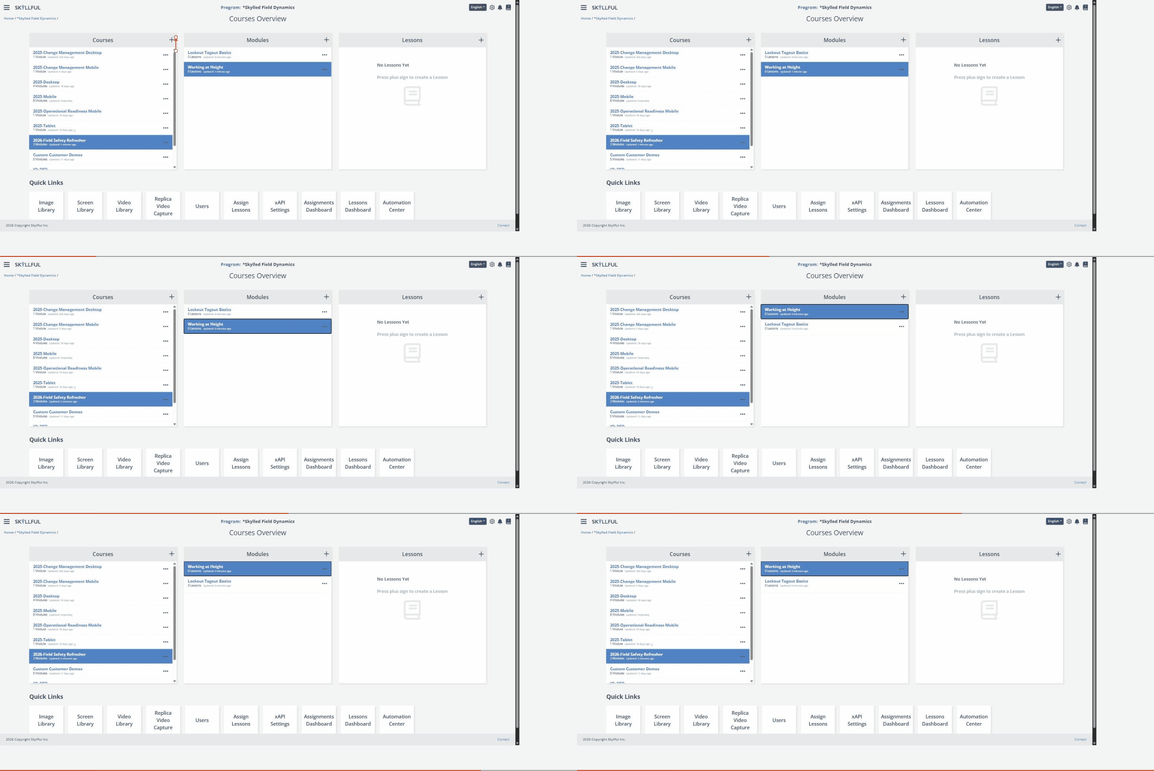
Reordering in the Modules panel. Lessons reorder the same way in the Lessons panel.
How do you move a module or lesson?
Use Move To when an item belongs somewhere else. It leaves its current parent.
Step |
Action |
|---|---|
| 1 | On the Courses Overview screen, navigate to the item. For a module, select its course. For a lesson, select its course and then its module. |
| 2 | Select the ... at the right of the row. |
| 3 | Select Move To. A submenu lists the destinations: courses for a module, modules for a lesson. |
| 4 | Select the destination. |
A module moves with its lessons intact, and a lesson moves with its steps intact. The item disappears from its original parent and appears in the destination.
If you choose the parent the item is already in, Skyllful blocks the move and tells you so rather than creating a duplicate.
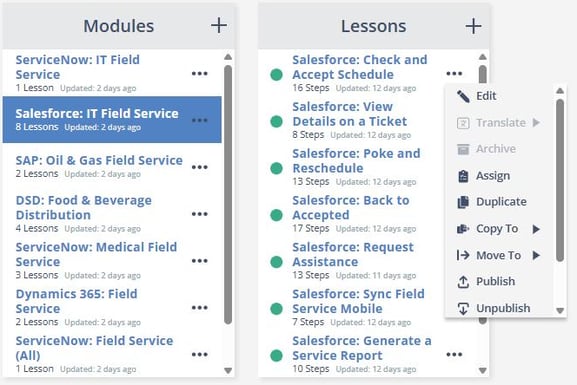
A module's Move To submenu lists the other courses. A lesson's lists the other modules.
How do you copy a module or lesson?
Use Copy To when the same content is needed in more than one place. The original stays where it is.
Step |
Action |
|---|---|
| 1 | On the Courses Overview screen, navigate to the item as you would to move it. |
| 2 | Select the ... at the right of the row. |
| 3 | Select Copy To. The submenu lists the same destinations Move To offers. |
| 4 | Select the destination. |
Which one should you use?
Situation |
Use |
|---|---|
| The item was filed in the wrong place | Move To |
| A course was split and its modules belong to the new courses | Move To |
| You want a starting point for something similar elsewhere | Copy To |
| The item is in the right place but in the wrong sequence | Drag to reorder |
Copies are independent after they are made. Editing a copy does not change the original, so content needed identically in several places will have to be updated in each place.
FAQ
Can I reorder courses? No. Courses are listed alphabetically and have no manual sort order. Only modules and lessons can be dragged into a new order. If you want related courses to sit together, give them a shared naming prefix.
Can I organize lessons without opening Lesson Builder? Yes. Lessons reorder, move, and copy from the Lessons panel on the Courses Overview screen, the same way modules do from the Modules panel.
Where does a lesson move to? To another module. A module moves to another course, and a lesson moves to another module.
Does moving a module take its lessons with it? Yes. The module moves as a unit, with its lessons intact.
What is the difference between Copy To and Duplicate? Duplicate creates a copy in the same place. Copy To creates a copy somewhere else.
If I edit a copied module or lesson, does the original change? No. Copies are independent after they are created, so each one has to be updated separately.
Does reordering affect learners who are partway through? Reordering changes the sequence learners see. Check your active assignments before reordering content that is in progress.
Skyllful Knowledge Base | Administrators, Content Developers