
What does archiving do?
Archiving takes a course or module out of active use and removes it from the working list in your Learning Program. It is how you retire training you no longer deliver, so your content developers work from a current view instead of scrolling past material that no longer applies.
Nothing in Skyllful is ever hard deleted. Archiving does not destroy your content. The course or module, and everything nested inside it, still exists. What changes is that it no longer appears in your active list.
The tradeoff is that archiving is not self-service to reverse. An archive can only be undone by Skyllful Support. If you archive something in error, open a support ticket and ask to have it restored.
|
|
Unpublish |
Archive |
|---|---|---|
| What it is for | Taking content offline temporarily | Retiring content you no longer deliver |
| Stays in the active list | Yes | No |
| Content is destroyed | No | No. Nothing is ever hard deleted. |
| How you reverse it | Select Publish yourself | Open a ticket with Skyllful Support |
Because you cannot undo it on your own, archive deliberately.
Before you archive
Check |
Why it matters |
|---|---|
| Active assignments | Confirm no current assignment depends on the course or module. |
| What is nested inside | Archiving a course takes its modules and lessons with it. |
| Whether you mean unpublish | If the content is coming back, unpublish instead. You can reverse that yourself. See Publish and Unpublish a Course or Module. |
| Whether you mean move | If the content is still useful but filed in the wrong place, move the module instead. See Organize Modules. |
If you are unsure, unpublish. Unpublishing takes content out of learners' hands immediately and costs you nothing to reverse, which gives you time to decide whether the retirement is permanent.
How do you archive a course or module?
Archive takes effect the moment you select it. There is no confirmation prompt. Check that you are on the right row before you open the menu.
Step |
Action |
|---|---|
| 1 | Select the menu icon (☰), select your program name, select Studio, then select Courses Overview. |
| 2 | To archive a module, select its course in the Courses panel first. To archive a course, skip this step. |
| 3 | Select the ... at the right of the row. |
| 4 | Select Archive. |
The item disappears from the active list in its panel immediately.
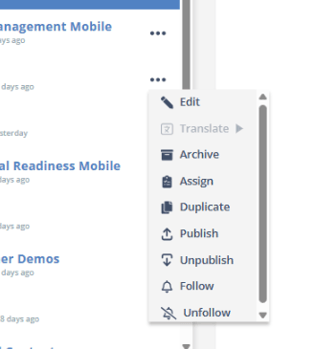
Archive sits third from the top of the actions menu.
How do you restore something you archived by mistake?
Restoring an archived course or module is handled by Skyllful Support rather than in Studio.
Step |
Action |
|---|---|
| 1 | Open a ticket with Skyllful Support. |
| 2 | Give the name of the archived course or module, the Learning Program it belonged to, and roughly when it was archived. |
| 3 | Support restores it to your Learning Program. |
Because your content is never hard deleted, an accidental archive is recoverable. It just is not something you can undo yourself.
FAQ
Is archiving the same as deleting? No. Nothing in Skyllful is ever hard deleted. Archiving removes a course or module from your active list, but the content and everything inside it still exists.
Will I be asked to confirm before it archives? No. Archive takes effect immediately, with no confirmation step. That is another reason to archive deliberately.
Can I bring an archived course back myself? No. Archives can only be undone by Skyllful Support. Open a ticket and ask for the item to be restored.
What happens to the modules inside an archived course? They go with the course, since a module lives inside its course. Restoring the course through Support brings them back with it.
Should I archive or unpublish? Unpublish if the content is coming back, because you can reverse that yourself. Archive if the training is finished for good.
I archived the wrong item. What now? Open a support ticket with the item's name, its Learning Program, and roughly when you archived it. Nothing is lost.
Who can archive? Archiving is an administrator action. If Archive does not appear in your actions menu, contact your administrator.
Skyllful Knowledge Base | Administrators