
What is a job role in Skyllful?
Job roles let you tailor training to specific positions. They allow different courses of lessons to be assigned to learners within a single assignment. Job roles are set per Learning Program.
How do you add a job role?
| Step | Action |
|---|---|
| 1 | Open the Learning Program where you want to add the job role. |
| 2 | Click the gear (settings) icon at the top right to open Learning Program Settings. |
| 3 | Open the Job Roles tab. |
| 4 | Click the plus (+) icon. |
| 5 | Enter the title in the Job Title field. |
| 6 | Click Create. |
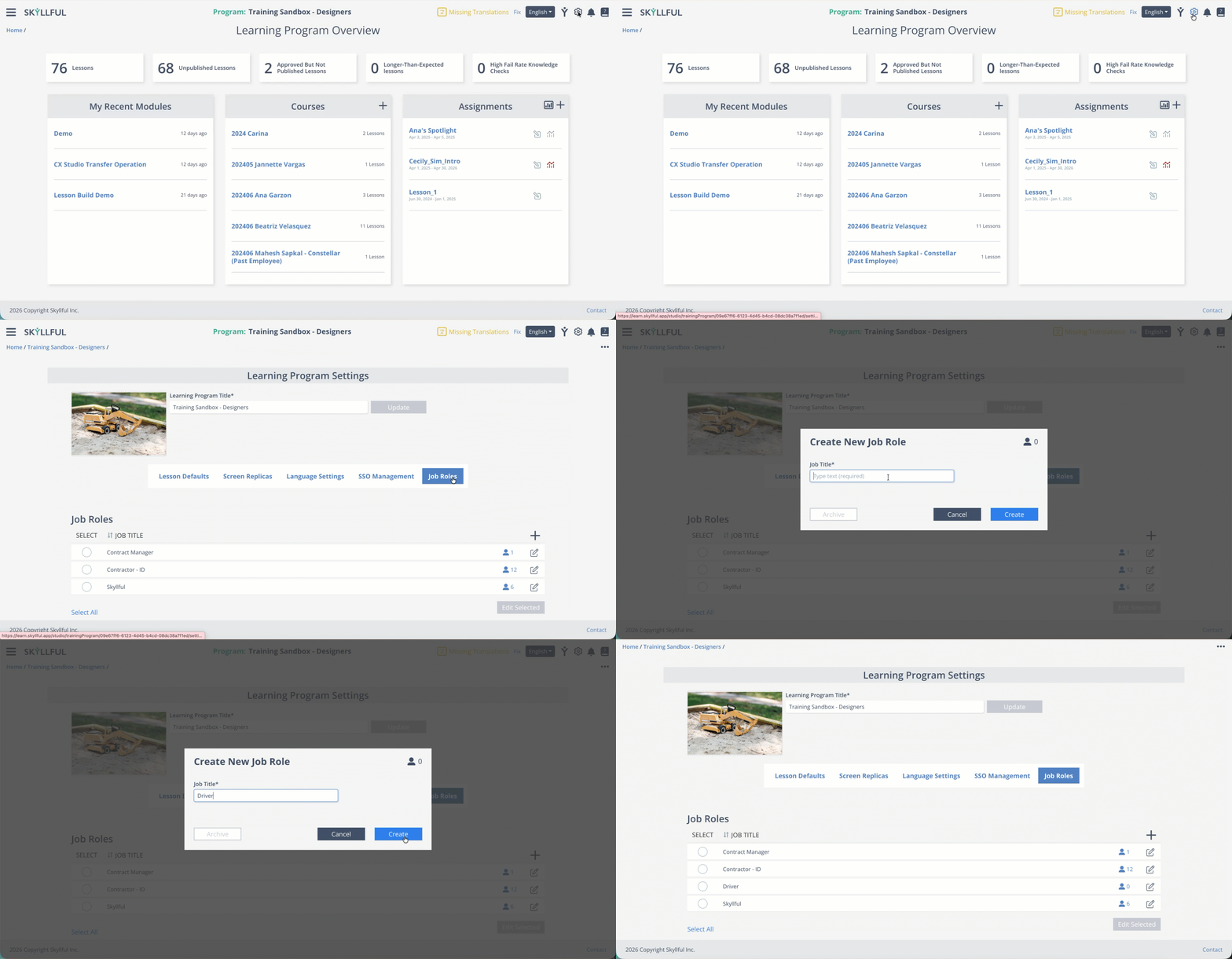
Adding a job role from Learning Program Settings.
FAQ
Where do job roles come from? You create them in each Learning Program's settings, on the Job Roles tab.
Can I assign different lessons to different roles? Yes. Job roles let you assign different courses of lessons within a single assignment.
Related Articles
- Edit a Job Role: rename or bulk-edit roles. [LINK TO: Edit a Job Role]
- Add a User: assign a job role to a user. [LINK TO: Add a User]
Last Reviewed: February 17, 2026 | Skyllful Knowledge Base | Administrators